


Running an online store without regularly auditing your SEO is like operating a physical shop without checking whether customers can find the entrance.
An ecommerce SEO audit identifies technical issues, content gaps, indexing problems, and optimization opportunities that prevent your store from ranking in Google and AI-powered search engines.
Whether you use Shopify, WooCommerce, Magento, BigCommerce, or a custom ecommerce platform, this guide walks you through the exact process used by professional SEO consultants to improve visibility, increase qualified traffic, and generate more revenue.
What is an ecommerce SEO audit?
An ecommerce SEO audit is a comprehensive evaluation of an online store’s technical SEO, on-page optimization, content quality, site architecture, user experience, and backlink profile.
The goal is to identify issues that prevent search engines from crawling, indexing, and ranking product and category pages effectively.
Why Ecommerce SEO Site Audit Matter?
Unlike regular websites, ecommerce stores often contain:
- Thousands of product pages
- Duplicate content
- Filtered URLs
- Pagination
- Out-of-stock products
- Complex navigation
- Thin category pages
Without regular audits, these issues accumulate and reduce search visibility.
A complete SEO audit helps you:
- Increase organic traffic
- Improve product page rankings
- Reduce crawl waste
- Fix indexing problems
- Improve Core Web Vitals
- Increase conversions
- Build stronger topical authority
- Improve visibility in AI search engines
How to Do an Ecommerce SEO Audit (Step-by-Step)
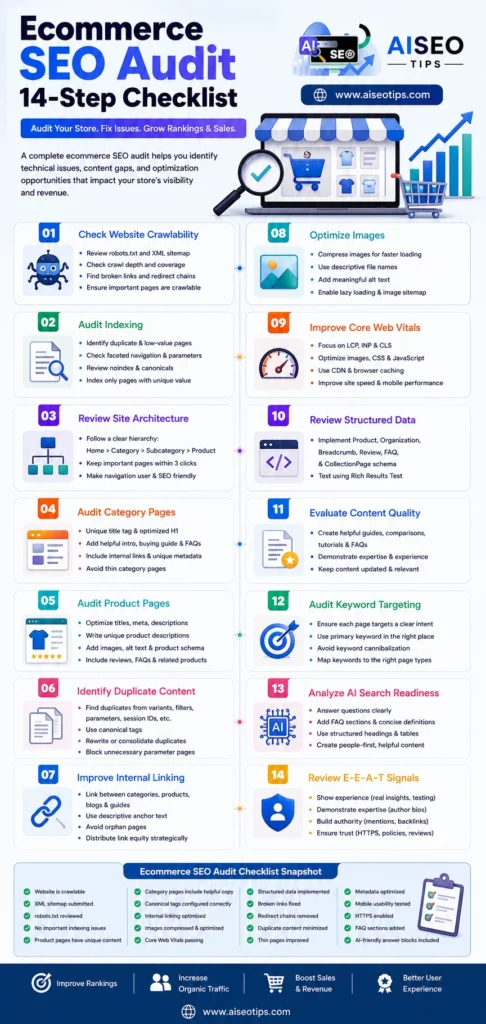
Step 1: Check Website Crawlability
Search engines must discover every important page before they can rank it.
Verify:
- robots.txt configuration
- XML sitemap
- orphan pages
- crawl depth
- broken internal links
- redirect chains
- canonical tags
Important questions:
- Can Google reach every category?
- Can product pages be crawled?
- Are important pages blocked accidentally?
Step 2: Audit Indexing
Not every indexed page deserves to be in Google’s index.
Check for:
- duplicate product URLs
- faceted navigation pages
- search result pages
- parameter URLs
- archived collections
- staging pages
- low-value pages
Index only pages with unique value.
Step 3: Review Ecommerce Site Architecture
Good ecommerce architecture helps both users and search engines.
Recommended structure:
Home > Category > Subcategory > Product
Avoid creating products that require five or six clicks from the homepage.
Every important page should be accessible within three clicks.
Step 4: Audit Category Pages
Category pages often generate the highest organic traffic.
Each category should include:
- Unique title tag
- Optimized H1
- Helpful introduction
- Buying guide
- FAQs
- Internal links
- Unique metadata
Avoid category pages with only product listings.
Google increasingly rewards pages that help users make buying decisions.
Step 5: Audit Product Pages
Every product page should provide unique value.
Optimize:
- Product title
- SEO title
- Meta description
- Product description
- Image alt text
- Product schema
- Customer reviews
- FAQs
- Internal links
- Related products
Avoid using manufacturer descriptions.
Unique content helps product pages compete effectively.
Step 6: Identify Duplicate Content
Duplicate content is one of the largest ecommerce SEO challenges.
Common sources include:
- Manufacturer descriptions
- Product variants
- URL parameters
- Session IDs
- Filter pages
- Sorting pages
- Print versions
Solutions:
- Canonical URLs
- Rewrite descriptions
- Consolidate duplicates
- Block unnecessary parameter pages
Step 7: Improve Internal Linking
Internal links distribute authority across your store.
Link strategically between:
- Categories
- Subcategories
- Buying guides
- Product comparisons
- Blog posts
- Related products
Avoid orphan pages.
Every important page should receive internal links.
Step 8: Optimize Images
Image SEO is especially important for ecommerce.
Best practices:
- Compress images
- Use descriptive filenames
- Add meaningful alt text
- Enable lazy loading
- Serve next-generation formats
- Include image sitemap
Optimized images can generate traffic from Google Images and AI-powered visual search.
Step 9: Improve Core Web Vitals
Speed directly impacts rankings and conversions.
Measure:
- Largest Contentful Paint (LCP)
- Interaction to Next Paint (INP)
- Cumulative Layout Shift (CLS)
Improve performance by:
- Compressing images
- Using a CDN
- Removing unused JavaScript
- Optimizing CSS
- Reducing third-party scripts
- Enabling caching
Step 10: Review Structured Data
Structured data helps search engines understand your store.
Implement:
- Product Schema
- Organization Schema
- Breadcrumb Schema
- Review Schema
- FAQ Schema
- CollectionPage Schema
Rich results improve click-through rates.
Step 11: Evaluate Content Quality
Google rewards stores that demonstrate expertise.
Instead of publishing only products, create supporting content:
- Buying guides
- Product comparisons
- Tutorials
- Industry trends
- Maintenance guides
- FAQs
- How-to articles
This strengthens topical authority.
Step 12: Audit Keyword Targeting
Each page should target a clear search intent.
Examples:
Category pages
- running shoes
- office chairs
- wireless headphones
Product pages
- Nike Air Zoom Pegasus 42
- Herman Miller Aeron Size B
Informational pages
- how to choose running shoes
- office chair buying guide
Avoid targeting multiple primary keywords on the same page.
Step 13: Analyze AI Search Readiness
AI-powered search engines increasingly summarize content instead of displaying only links.
To improve AI search visibility:
- Answer questions directly
- Use concise definitions
- Add FAQ sections
- Structure headings logically
- Include comparison tables
- Cite first-hand experience where appropriate
- Demonstrate expertise
- Keep information updated
Content written for people first performs better across both traditional search and AI-generated answers.
Step 14: Review E-E-A-T Signals
Google values websites that demonstrate:
Experience
Include real product testing, customer insights, and practical examples.
Expertise
Publish content written or reviewed by knowledgeable contributors.
Authoritativeness
Earn mentions from reputable websites and build topical authority.
Trustworthiness
Display clear contact information, return policies, HTTPS security, customer reviews, and transparent business details.
Ecommerce SEO Audit Checklist
Use this checklist during every audit:
- Website is crawlable
- XML sitemap submitted
- robots.txt reviewed
- No important indexing issues
- Product pages have unique content
- Category pages include helpful copy
- Canonical tags configured correctly
- Internal linking optimized
- Images compressed and optimized
- Core Web Vitals passing
- Structured data implemented
- Broken links fixed
- Redirect chains removed
- Duplicate content minimized
- Thin pages improved
- Metadata optimized
- Mobile usability tested
- HTTPS enabled
- FAQ sections added
- AI-friendly answer blocks included
Common Ecommerce SEO Mistakes to Avoid in 2026
Avoid these issues:
- Copying manufacturer descriptions
- Ignoring category pages
- Slow-loading product pages
- Missing schema markup
- Poor internal linking
- Excessive faceted navigation
- Duplicate product URLs
- Weak metadata
- Thin content
- Broken pagination
- Missing image optimization
Best Tools for an Ecommerce SEO Audit
Professional SEOs commonly use the following SEO tools for audit:
- Google Search Console
- Google Analytics 4
- Screaming Frog SEO Spider
- Ahrefs
- Semrush
- Sitebulb
- PageSpeed Insights
- Rich Results Test
- Bing Webmaster Tools
Using multiple tools provides a more complete picture of your store’s SEO health.
Final Thoughts
An ecommerce SEO audit is not a one-time task but an ongoing process. As products, categories, and customer behavior evolve, regular audits help maintain strong organic visibility. Focus first on crawlability, indexing, site architecture, content quality, user experience, and structured data.
Then strengthen your store with helpful content that answers customer questions and demonstrates real expertise. This approach supports both traditional search rankings and emerging AI-powered search experiences.
Consistent audits combined with regular optimization will position your ecommerce store to compete successfully in both Google Search and the rapidly evolving landscape of AI-driven search.
People Also Ask
For most online stores, conduct a full audit every three to six months, with monthly checks for indexing, broken links, and performance.
Duplicate content, poor site architecture, thin category pages, and slow loading speeds are among the most common issues affecting rankings.
Yes. By fixing technical errors, improving product visibility, and enhancing user experience, an audit can increase qualified organic traffic and conversion opportunities.
Both are essential. Technical SEO ensures search engines can access your pages, while high-quality content helps those pages rank and convert visitors.
Yes. Structuring content with clear answers, FAQs, schema markup, and strong E-E-A-T signals makes your store more suitable for AI-generated search responses as well as traditional search engines.
